If you’re rearranging your living room and need to move your TV to another side of the room, you might face a problem: the coaxial cable is too short. Fortunately, you don’t have to halt your remodeling project. With a coaxial cable extension, you can easily connect your TV without any issues.
In this guide, you’ll learn how to extend a coaxial cable efficiently and effortlessly.
Required Materials
Before you start, make sure you have the following items:
- Multimeter (optional): To check for active electrical currents.
- Measuring tape: To measure the required cable length accurately.
- Additional coaxial cable: It’s essential to choose a compatible type of cable.
- F-type extension adapter (“barrel adapter”): A connector that joins two coaxial cables.
- Coaxial compression connectors: Metal terminals that ensure a secure connection to devices.
Steps to Extend a Coaxial Cable
1. Take Safety Precautions
Before handling the coaxial cable, unplug it from any electronic device. If desired, use a multimeter to check for active electrical currents.
2. Measure the Required Distance
Accurately measure the distance you need to cover with the additional coaxial cable. It’s advisable to add a few extra inches to avoid tension or insufficient length.
Keep in mind that excessive use of extenders may cause signal loss, affecting transmission quality.
3. Prepare the Cables
Ensure that the F-connectors are securely fastened on both ends of the coaxial cable. You can tighten them by hand or use pliers for a firmer grip.
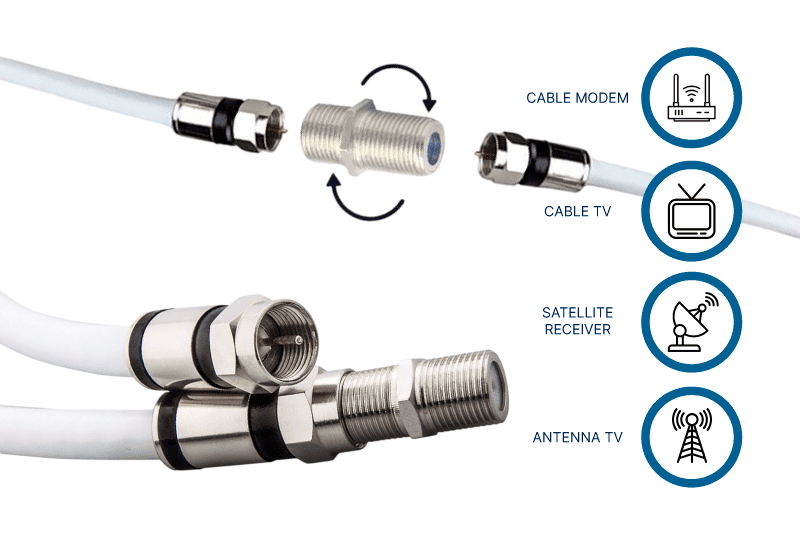
4. Connect the Cables
Once your cables are ready, follow these steps:
- Connect one end of the coaxial cable to the extension adapter.
- Make sure the connection is firm and secure.
- Attach the other end of the adapter to the additional coaxial cable.
If you need a longer extension, you can add more cables and connectors, though this might affect signal quality.
5. Connect the Extended Cable to the TV
Finally, plug the free end of the coaxial cable into your TV and ensure a tight connection. Then, connect the other end to the signal source, such as an antenna or set-top box.
Turn on your TV and run a channel scan to verify that the signal is stable and that both audio and video quality meet your expectations.
Summary
Extending a coaxial cable for your TV is a straightforward process if you have the right materials and follow the correct steps. Ensure that all connections are secure and avoid excessive use of extenders to minimize signal loss. With this guide, you can rearrange your living space without worrying about your TV’s location.
If you would like to receive a quote for any of custom cables or connectors, please do not hesitate to contact us by sending an email to sales@readytogocables.com or calling in the USA this phone number (682-325-1944).