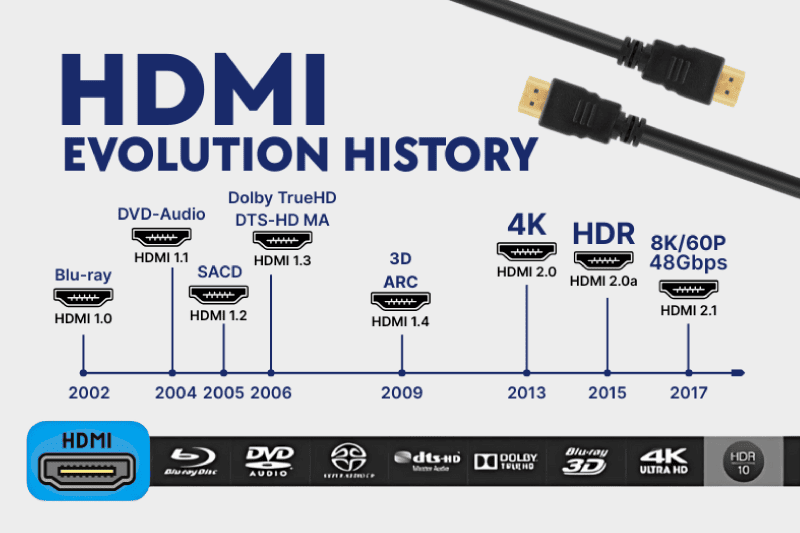
The Evolution of HDMI has transformed the way audio and video signals are transmitted. Starting from version 1.0 to the latest 2.1, significant advancements in bandwidth, resolution, and additional features have enhanced user experiences. This article explores these developments, highlighting the key features introduced in each version. It also discusses the role of custom cables in optimizing HDMI performance across different devices.
Understanding HDMI: Basic Concepts
HDMI, or High-Definition Multimedia Interface, is an important technology that has transformed the way audio and video are transmitted between devices. Below are fundamental concepts that form the basis of HDMI technology.
What is HDMI?
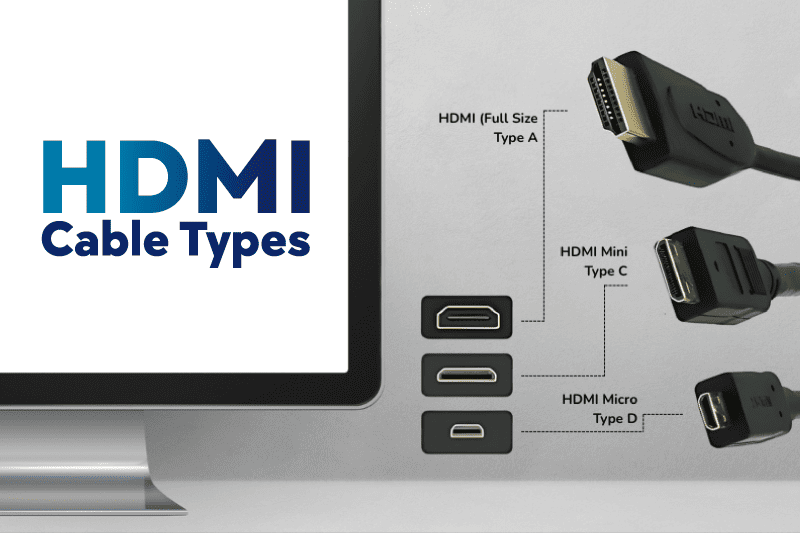
HDMI is a digital interface that allows the transfer of high-quality audio and video signals through a single cable. By supporting both standard and high-definition video, HDMI enables seamless connectivity for a wide range of devices, including televisions, projectors, gaming consoles, and computers. The robust design of HDMI connectors ensures reliable connections, diminishing the risk of signal loss that other interfaces might experience.
Since its introduction, HDMI has become the standard for connecting high-definition devices due to its ability to transmit uncompressed digital audio and video data. This means that users can enjoy superior sound and picture quality without the degradation typically associated with analog connections. HDMI also supports various formats, such as 3D video, deep color, and multiple audio channels, enhancing the overall viewing experience.
HDMI vs. Other Interfaces
The growth of HDMI technology has established it as a leading interface in the consumer electronics market. Comparing HDMI with other common interfaces provides insights into its advantages and unique features.
HDMI vs. DisplayPort
DisplayPort is another popular digital interface commonly used for video and audio transmission, particularly in computer displays. While both HDMI and DisplayPort can transmit high-definition content, they cater to different market segments. HDMI is widely used in home entertainment systems, while DisplayPort is prevalent in professional computing environments.
Key differences include:
- DisplayPort can support higher resolutions and refresh rates, making it a preferred choice for gaming and high-performance applications.
- HDMI carries Consumer Electronics Control (CEC) capabilities, allowing users to control multiple devices with one remote.
- DisplayPort can daisy-chain multiple monitors from a single output, whereas HDMI cannot.
HDMI vs. DVI
DVI (Digital Visual Interface) was one of the earlier digital interfaces and offers a different connection experience. DVI is primarily focused on video transmission, lacking support for audio in many configurations. This limitation makes HDMI a more versatile option for modern devices.
Important distinctions include:
- HDMI supports audio transmission along with video, allowing for a simpler connection with fewer cables.
- DVI can handle digital signals but does not support features like HDCP (High-bandwidth Digital Content Protection) in its simpler forms.
- HDMI connectors are smaller and more user-friendly compared to DVI connectors, which can be larger and more cumbersome.
HDMI 1.0 to 1.4: The Early Years
The introduction of HDMI marked a significant shift in how audio and video signals were transmitted. From its initial version to the advancements seen in subsequent releases, HDMI rapidly evolved to meet the needs of consumers and technology developers alike.
Introduction to HDMI 1.0
Launched in December 2002, HDMI 1.0 was the first version of this technology, designed to replace older analog video standards. This digital interface allowed for the transmission of high-definition video and multi-channel audio over a single cable, making connectivity easier and more efficient for consumers. The initial specification supported a maximum bandwidth of 4.95 Gbps, enabling support for 1080p video formats and eight audio channels. This simplification of connections quickly gained popularity among both manufacturers and consumers seeking streamlined devices.
Advancements in HDMI 1.1 to 1.4
Between 2004 and 2009, HDMI underwent several updates that progressively enhanced its capabilities. Each version introduced features designed to improve performance and compatibility across devices.
Audio Return Channel
Introduced with HDMI 1.4 in May 2009, the Audio Return Channel (ARC) feature allowed for two-way audio communication. This meant a television could send audio back to an AV receiver without the need for a separate audio cable. This functionality was particularly useful for smart TVs and simplified home theater setups, enabling users to enjoy high-quality sound from streaming sources.
HDMI Ethernet Channel
Also part of the HDMI 1.4 specification, the HDMI Ethernet Channel (HEC) was another significant addition. This feature allowed for a high-speed internet connection through the HDMI cable itself, enabling internet-enabled devices to share a single connection without additional wires. By integrating internet capability, HDMI devices could seamlessly access online services and receive firmware updates, enhancing user experience.
3D Video and Audio Support
The demand for 3D content was on the rise during the late 2000s, prompting HDMI 1.4 to include support for 3D video formats. This version allowed for the transmission of 3D signals at different resolutions, thus accommodating various 3D playback methods, such as 3D Blu-ray and gaming systems. Alongside this, audio support improvements ensured that multi-channel audio formats, crucial for immersive sound experiences, were adequately supported, positioning HDMI as a robust choice for next-gen media.
HDMI 2.0: A New Era
The introduction of HDMI 2.0 marked a significant turn in the capabilities of HDMI technology, enhancing the experience for both consumers and professionals. With increased bandwidth and advanced features, HDMI 2.0 set a new standard for high-definition audio and video transmission.
Key Features of HDMI 2.0
This version introduced several essential features aimed at improving the overall audiovisual experience. One of the most notable changes was the increase in bandwidth capacity, which expanded up to 18 Gbps. This upgrade allowed for higher resolutions and refresh rates, making HDMI 2.0 a vital component of modern home entertainment systems.
- Support for 4K resolution at 60 frames per second (fps)
- Capability to carry up to 32 audio channels
- Support for simultaneous delivery of dual video streams to multiple users on the same screen
- Enhanced audio return channel (ARC) capability
Resolutions and Refresh Rates
HDMI 2.0 brought about significant changes in resolutions and refresh rates, allowing for a richer visual experience. The support for 4K resolution at 60 Hz opened new avenues for viewing high-definition content, essential for movie enthusiasts and gamers alike.
This enhancement is particularly relevant for those using large screens or projectors, as it ensures that video playback remains smooth and clear during fast-paced scenes.
High Dynamic Range
Another noteworthy feature of HDMI 2.0 is the support for High Dynamic Range (HDR) content. This technology allows for a greater contrast ratio between light and dark areas of an image, providing more detail and depth. As a result, colors appear more vibrant and lifelike, enhancing the overall viewing experience.
Audio and Video Synchronization
The introduction of HDMI 2.0 also prioritized audio and video synchronization. This feature mitigates the delay often experienced between video and sound, ensuring that the audio aligns perfectly with the visuals. Such improvements are particularly beneficial for live broadcasts and fast-paced entertainment, where latency can detract from the engagement of the viewer.
HDMI 2.1: The Future Unfolds
HDMI 2.1 represents a significant advancement in HDMI technology, opening the door to new possibilities for audio and video experiences. This version introduces features designed to enhance performance and provide a richer user experience.
Enhanced Features of HDMI 2.1
The enhanced features of HDMI 2.1 cater to the growing demands for high-quality audio and video. These innovations not only improve the overall efficacy of devices but also ensure compatibility with emerging technologies.
Variable Refresh Rate
Variable Refresh Rate (VRR) is a groundbreaking technology incorporated in HDMI 2.1. This feature allows for dynamic adjustment of the refresh rate of a display. The result is a smoother visual experience, particularly when playing video games. By synchronizing the refresh rate of the display with the frame rate of the content, VRR effectively eliminates screen tearing and stuttering. Gamers, in particular, will appreciate the fluidity this feature brings to high-paced action sequences.
Enhanced Audio Return Channel
Another key feature is the Enhanced Audio Return Channel (eARC). This evolution allows for a higher bandwidth audio signal to travel from the TV back to the audio system. Users can expect support for uncompressed audio formats, including Dolby Atmos and DTS:X. The eARC feature simplifies connectivity as it reduces the number of cables needed while improving audio quality, creating a more immersive sound experience.
High Bandwidth Digital Content
HDMI 2.1 also supports High Bandwidth Digital Content Protection (HDCP) 2.3, enabling the transmission of high-definition and ultra-high-definition content without compression. This capability is essential as streaming services increasingly provide 4K and 8K content. HDMI 2.1 can handle up to 48 Gbps of bandwidth, which significantly enhances support for higher resolutions and refresh rates.
- Support for 8K resolution at 60 Hz
- Support for 4K resolution at up to 120 Hz
- Ability to transmit HDR (High Dynamic Range) content seamlessly
These advancements ensure that HDMI 2.1 presents a formidable option for consumers looking to future-proof their home theaters and media systems. The comprehensive upgrade addresses both audio and video enhancements, paving the way for richer, more engaging viewing experiences as technology continues to evolve.
Custom Cables and Their Role
Custom cables play a significant role in optimizing HDMI performance. These specialized cables cater to specific needs, ensuring high-quality transmission of audio and visual signals without degradation. Understanding their functionality and advantages can enhance the overall user experience with HDMI devices.
Understanding Custom Cables
Custom cables are designed to meet the unique requirements of various setups and devices. Unlike standard off-the-shelf cables, custom options allow for tailored specifications such as length, connectors, and shielding. This means users can select features that best suit their home theater systems, gaming setups, or professional installations.
These cables can be constructed using different materials and designs to enhance signal integrity, reduce interference, and accommodate diverse environments. For instance, high-quality shielding is essential in minimizing electromagnetic interference, especially in complex setups with multiple electronic devices operating simultaneously.
Custom Cables for HDMI Devices
When it comes to HDMI devices, custom cables provide essential advantages. They are especially beneficial in installations where standard cables may not perform optimally due to distance or specific routing requirements. Below are some scenarios where custom cables excel:
- Long-Distance Connections: For setups extending beyond 25 feet, standard HDMI cables may struggle with signal quality. Custom cables can be engineered with advanced materials to ensure a clear signal over greater distances.
- Unique Environments: In environments with high electromagnetic interference (EMI), custom cables can be shielded more effectively, preventing signal degradation.
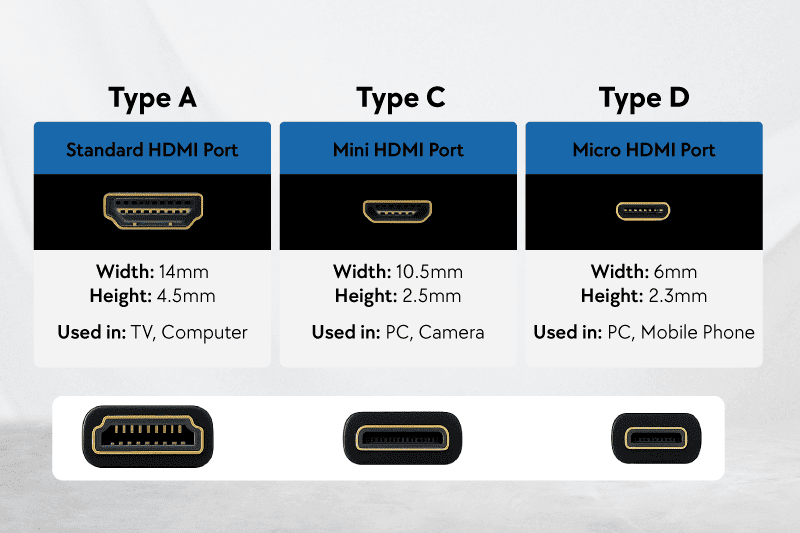
- Specialized Connectors: Custom cables enable the use of specialized connectors that may not be available in standard formats, enhancing compatibility with unique devices or setups.
Benefits of Custom Cables
The advantages of custom cables extend far beyond their tailored design. Key benefits include:
- Enhanced Performance: Custom cables often deliver superior performance metrics, including bandwidth capabilities and signal stability.
- Flexibility in Design: Users can specify lengths and configurations, making it easier to manage cable organization in complex installations.
- Specific Functionality: Custom cables can be designed to support features such as high refresh rates or 4K video output, ensuring compatibility with the latest HDMI specifications.
When to Use Custom Cables
Several situations may warrant the use of custom cables. Recognizing these scenarios can assist in making informed decisions:
- Complex Installations: In large setups where multiple devices are interconnected, custom cables can optimize signal flow and reduce clutter.
- Home Theater Enthusiasts: Audiophiles and videophiles often seek the best quality, and investing in custom cables can enhance the overall experience.
- Gaming Setups: Custom cables can minimize latency and maximize performance, which is crucial for competitive gaming.
HDMI and the Consumer Electronics Market
The integration of HDMI technology has had profound implications for the consumer electronics market, influencing device innovation and enhancing user experiences across various platforms.
Growth of HDMI Devices
The proliferation of HDMI devices has been remarkable since its inception. With the continuous development of technology and increasing consumer demand for high-quality audio-visual experiences, manufacturers have embraced HDMI in diverse products. The following factors contribute to this growth:
- Widespread Adoption: HDMI ports have become standard in most consumer electronics, including televisions, gaming consoles, projectors, and home theater systems.
- Enhanced Capabilities: Advancements in HDMI, such as 4K and 8K support, variable refresh rates, and enhanced audio return channels, have driven the market, enabling consumers to enjoy superior picture and sound quality.
- Cross-Compatibility: One of the key advantages of HDMI is its compatibility across various devices and platforms, simplifying connections and enhancing usability for consumers.
- Emerging Technologies: Innovations like virtual reality and augmented reality integrations demand high-bandwidth connections that HDMI readily supports, further fueling growth in this sector.
Impact on Consumer Electronics
The influence of HDMI on consumer electronics is multifaceted, shaping not only product design but also overall market trends. The following aspects illustrate this impact:
- Device Innovation: The demand for HDMI-compatible devices has spurred technological advancements, encouraging manufacturers to design products that meet evolving consumer needs.
- Market Competition: With many manufacturers seeking to capitalize on HDMI’s advantages, competition in the consumer electronics market has intensified, leading to better pricing and enhanced features for consumers.
- Consumer Expectations: As consumers become more knowledgeable about technology, expectations for high-definition audio and video have risen. The standardization of HDMI has made it essential for manufacturers to deliver high-quality experiences to stay relevant in a competitive landscape.
- Integration with Other Technologies: HDMI has paved the way for seamless integration with other technologies, such as smart home systems and streaming devices, further expanding its footprint within the electronics market.
HDMI Licensing and Specifications
Understanding HDMI licensing and specifications is crucial for the development and adoption of HDMI technology. Through rigorous standards, the functionality, compatibility, and performance of HDMI devices continue to evolve.
Role of HDMI Licensing, LLC
The HDMI Licensing, LLC is responsible for overseeing the licensing of HDMI specifications and helping to ensure interoperability between devices. This organization plays a pivotal role in maintaining the integrity and consistency of the HDMI standard. It provides resources for manufacturers and developers, ensuring they comply with HDMI specifications while promoting consumer awareness and protection.
HDMI Licensing, LLC also manages the certifications of HDMI products. Manufacturers must have their products tested to confirm they meet the required specifications. Those products that pass are granted HDMI certification, allowing them to bear the HDMI logo. This certification helps consumers identify which products are reliable and high-quality.
Updates to HDMI Specifications
Over the years, HDMI specifications have undergone several updates to incorporate new technologies and consumer demands. Keeping track of these updates is vital for both manufacturers and consumers alike.
- HDMI 1.0 to 1.4 introduced significant features such as support for 3D video, audio return channels, and HDMI Ethernet channels.
- HDMI 2.0 expanded capabilities by enhancing bandwidth to support higher video resolutions and frame rates, paving the way for 4K content.
- HDMI 2.1 brought transformative changes like enhanced audio return channels (eARC), variable refresh rate (VRR), and the capability to handle 8K video, indicating the standard’s adaptation to modern technology.
Each revision reflects the evolving landscape of consumer electronics that require higher bandwidth and improved features. Staying updated with the latest specifications benefits manufacturers in creating innovative products that meet modern viewing standards.
Furthermore, the official HDMI specification documentation is continuously made available to the industry. This transparency encourages innovation while defining clear guidelines that help prevent incompatibility between devices.
As technology advances, HDMI Licensing, LLC remains dedicated to refining these specifications, ensuring that HDMI continues to be a leader in high-quality audio and video transmission.
Troubleshooting HDMI Connections
Troubleshooting HDMI connections can resolve a variety of issues that affect audio and video quality. Understanding common problems and their solutions is essential for ensuring a smooth viewing experience.
Common HDMI Issues
Several problems can arise with HDMI connections, often leading to frustration for users. Some of the most frequent issues encountered include:
- Signal Loss: This can manifest as a blank screen or no audio, indicating a disruption in the HDMI signal.
- Poor Resolution: Users may experience subpar video quality, with video appearing pixelated or blurry.
- Input Lag: A delay between the device’s output and what is displayed on the screen can disrupt gameplay or video playback.
- Audio Problems: Issues such as no sound or out-of-sync audio can detract from the overall experience.
- HDCP Errors: These error messages often appear when a device cannot establish a secure connection due to copyright protection protocols.
Solutions for Enhanced HDMI Performance
Addressing HDMI connection issues can often be achieved through simple troubleshooting steps. Here are several solutions to improve HDMI performance:
- Check Cable Connections
Ensure that all HDMI cables are properly connected and secure. Loose connections can result in signal loss and unreliable performance. - Inspect HDMI Cables
Examine cables for any visible damage, such as fraying or kinks. Replacing damaged cables may resolve many issues. - Use High-Quality Cables
Utilizing high-quality or custom cables can significantly enhance signal integrity, especially for long distances or high-resolution displays. - Test Different HDMI Ports
Switching to a different HDMI port on the television or device can sometimes reveal whether the issue lies with the port itself. - Restart Devices
Power cycling all devices in the HDMI chain—including TVs, receivers, and source devices—can often reset connections and resolve temporary issues. - Update Device Firmware
Check for firmware updates on all devices. Manufacturers frequently release updates that improve compatibility and performance. - Change Display Settings
Adjusting the display settings, such as resolution and refresh rate, on the source device can sometimes rectify display issues. - Lookfor HDCP Compatibility
Ensure that all devices in the HDMI chain support HDCP (High-bandwidth Digital Content Protection) if using protected content. Mismatched HDCP versions can lead to errors.
By understanding common HDMI issues and executing these solutions, users can maintain optimal performance and enjoy their audio-visual experiences without disruptions.
If you would like to receive a quote for any of custom cables or connectors, please do not hesitate to contact us by sending an email to sales@readytogocables.com or calling in the USA this phone number (682-325-1944).