The RS232 serial port standard has been a fundamental part of data communication for many years. This article provides essential facts about its operation, applications, advantages, and limitations. Understanding how the RS232 serial port functions is crucial for anyone working with various communication devices. This includes insights into different cable types and the use of custom serial cables for specific needs.
Understanding the RS232 Serial Port Standard
Comprehending the RS232 serial port standard is essential for effective communication in various applications.
Definition and Basic Principles
The RS232 serial port standard is a widely used protocol that facilitates serial communication between devices. It outlines the electrical characteristics and physical wiring needed for the data exchange. This standard is primarily suited for short-distance communication, typically up to 50 feet, depending on the cable and environmental conditions.
Electrical Characteristics and Voltage Levels
The RS232 protocol relies on specific voltage levels to represent digital data. In this system:
- A logical ‘1’ is indicated by voltage levels between -3V and -15V.
- A logical ‘0’ is characterized by voltage levels from +3V to +15V.
This voltage configuration makes RS232 more prone to electrical noise compared to other modern communication standards that utilize differential signaling. Effective cable design and shielding can help mitigate noise interference.
Roles of DTE and DCE Devices
Understanding the roles of Data Terminal Equipment (DTE) and Data Communication Equipment (DCE) is crucial in RS232 configurations. The DTE typically represents the end-user device, such as a computer. In contrast, the DCE generally refers to any device that facilitates the connection to the DTE, such as a modem or serial port adapter.
In an RS232 setup, the communication path is established between these two categories. The DTE sends data to the DCE, which subsequently relays the information. This configuration emphasizes the need for compatible devices to ensure successful communication.
How Data Transmission Works in RS232 Serial Communication
The process of data transmission in RS232 serial communication is fundamental to understanding how devices exchange information. This section delves into the mechanisms that facilitate this communication.
The Start Bit, Data Bits, Parity, and Stop Bit
The data transmission in RS232 begins with establishing a clear signal structure. It involves several components that work together to accurately convey information:
- Start Bit: This bit signals the beginning of data transmission. When the receiving device detects the start bit, it prepares to receive the subsequent data.
- Data Bits: Typically ranging from 5 to 8 bits, these represent the actual information being sent. Each bit corresponds to a binary digit (0 or 1) and constructs the entire data byte.
- Parity Bit: An optional element, the parity bit provides a simple form of error-checking. It can be configured for even or odd parity, allowing error detection by indicating whether the number of set bits is even or odd.
- Stop Bit: This bit indicates the conclusion of the data packet. It allows the receiver to correctly recognize the end of the transmission cycle.
Full Duplex Communication Explained
Full duplex communication is a key feature of RS232 serial ports. This capability enables simultaneous two-way communication, allowing devices to send and receive data at the same time. In practical terms, this means that while one device transmits data, the other can process it or send responses without waiting for the first device to finish. This efficient communication model is especially beneficial in environments requiring real-time data exchange.
Synchronous vs Asynchronous Transmission
Data transmission in RS232 can be categorized into two types: synchronous and asynchronous. Each mode has its distinct characteristics:
- Synchronous Transmission: In this mode, data transfer is synchronized to a clock signal shared between devices. Timing is critical, and both sender and receiver operate in unison to ensure accurate data transfer. This method tends to be faster but requires more complex arrangements.
- Asynchronous Transmission: More commonly used with RS232, asynchronous communication does not rely on a shared clock. Instead, data packets are sent with start and stop bits to indicate timing. This simplicity makes asynchronous communication a popular choice, especially in applications like terminal connections where various devices must interact without extensive timing coordination.
Common Applications of the RS232 Serial Port
The RS232 serial port is widely utilized across various sectors, providing effective communication solutions for numerous devices and applications.
Computer and Peripheral Connections
This particular application has its roots in the early days of computing, where RS232 served as a crucial interface for connecting computers with peripheral devices. Various gadgets such as printers, modems, and serial mice relied heavily on this standard for data transfer.
- Printers: Many older printers adapted RS232 ports, allowing direct communication with computers, enabling users to send jobs seamlessly.
- Modems: Dial-up modems were among the first devices to adopt RS232 standards, linking users to the internet for the first time.
- Serial Devices: A range of serial devices utilizes RS232 for connection, including barcode scanners and robotic arms, confirming its long-term relevance.
Industrial Automation Systems
In the realm of industrial automation, RS232 ports serve as essential components for connecting sensors, controllers, and various machinery. These applications take advantage of the simple and reliable communication RS232 offers.
- Data Collection: Machines equipped with sensors can communicate operational data back to a central system for monitoring and analytics.
- Device Control: RS232 facilitates control commands sent from a computer to PLCs (Programmable Logic Controllers) or similar devices, enabling precise operations.
- Process Monitoring: Industrial systems can track real-time data on production metrics, allowing managers to make informed decisions based on current conditions.
Medical Device Integration
Medical settings also leverage the capabilities of RS232 to ensure seamless communication between various devices and central systems for patient management and data collection.
- Diagnostic Equipment: Devices like blood analyzers and ultrasound machines often utilize RS232 to relay vital information to computer systems for immediate analysis.
- Patient Monitoring Systems: RS232 enables the integration of monitoring devices, ensuring real-time transmission of crucial patient data to healthcare professionals.
- Data Transfer to Management Systems: Hospitals rely on RS232 for connecting medical devices to hospital information systems, allowing for streamlined data management.
Advantages of Using RS232 Serial Port
The RS232 serial port offers several benefits that make it a reliable choice for data communication across various applications. Its practicality and effectiveness have contributed to its sustained use even in modern systems.
Simplicity and Ease of Implementation
One of the standout features of the RS232 serial port is its straightforward design, which allows for quick and uncomplicated implementation. Setting up RS232 communication typically requires minimal configuration, enabling users to establish connections without extensive technical knowledge. This simplicity is particularly advantageous in environments where rapid deployment is essential.
- Intuitive setup procedures reduce troubleshooting time.
- Most devices come with standard connectors, facilitating plug-and-play capabilities.
- Developers can easily understand and apply the protocol across various platforms.
Universal Compatibility Across Devices
RS232’s status as a widely adopted standard means it enjoys universal compatibility among an extensive array of devices. From older legacy systems to modern peripherals, the standard is supported by countless manufacturers. This compatibility facilitates seamless integration with a diverse range of equipment, enhancing overall productivity.
- Users can connect from different brands without worrying about compatibility issues.
- The availability of numerous RS232 cables and connectors simplifies the connection process.
- Applications in industrial automation and medical devices leverage this broad compatibility for efficient operation.
Support for Full Duplex Data Transmission
RS232 enables full duplex communication, allowing devices to send and receive data simultaneously. This feature enhances overall efficiency, as it maximizes the use of available bandwidth during data exchanges. The ability to engage in two-way communication without interruptions supports real-time data transfer, which is crucial in many applications.
- Real-time communication increases the responsiveness of connected systems.
- Full duplex reduces latency and improves overall data transfer rates.
- This functionality is invaluable in scenarios requiring immediate feedback, such as industrial automation.
Challenges and Limitations of RS232 Communication
The RS232 serial port standard, while widely used, comes with several challenges and limitations that users must consider when implementing it in various applications. Understanding these obstacles is crucial for ensuring proper communication and making informed choices about hardware.
Limited Cable Length and Signal Degradation
One significant drawback of RS232 communication is its restricted cable length. Typically, the transmission distance does not exceed 50 feet, and for optimal performance, keeping cables shorter is advisable. Beyond this limit, signals may experience degradation, leading to data errors or communication failures.
- Longer distances increase resistance and reduce the signal quality.
- The risk of interference also heightens as cable length increases.
- Strategies such as using signal boosters or repeaters can mitigate degradation but may complicate setup.
Susceptibility to EMI and Other Interference
Electromagnetic interference (EMI) presents another major challenge for RS232. Because it transmits signals using unipolar voltage levels, external interference sources can disrupt data transfer. This susceptibility can lead to unreliable communication in environments with high electrical noise.
- Common sources of EMI include motors, fluorescent lights, and radio transmissions.
- Using shielded cables can help reduce the impact of EMI, but perfect shielding is hard to achieve.
- Proper grounding and layout planning are essential to minimize interference risks.
Moderate Data Transfer Speeds Compared to Modern Protocols
Compared to contemporary communication protocols, RS232 has relatively moderate data transfer speeds. The maximum achievable baud rate for standard RS232 is often around 115200 bps, which pales in comparison to newer standards that can exceed several megabits per second.
- This limitation affects the standard’s applicability, especially in data-intensive applications.
- Modern systems often require faster communication, prompting users to seek alternative solutions.
- In situations where speed is less critical, RS232 still remains a viable option.
The Need for Dedicated Custom Serial Cables
Another consideration when working with RS232 involves the requirement for dedicated cables. Unlike more flexible interfaces, RS232 connections often utilize specific custom serial cables tailored for various setups.
- Each device pairing may necessitate a unique configuration, increasing complexity during installation.
- Using the wrong cable type can lead to connection issues, making proper identification critical.
- Investing in high-quality, custom serial cables ensures reliability and longevity in connections.
Exploring Different Types of RS232 Cables
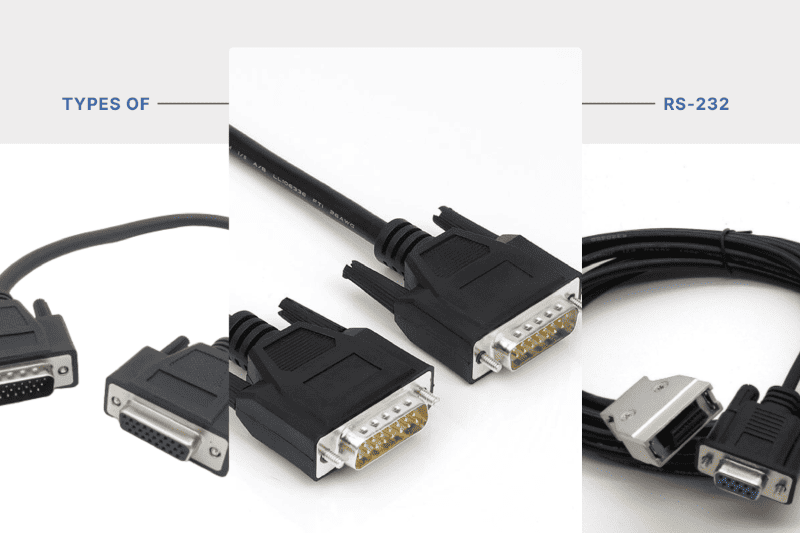
There are several varieties of RS232 cables designed for specific purposes, each tailored to suit different types of connections and device communication needs.
Straight-Through Cables for DTE to DCE Connections
Straight-through cables are the most commonly used type of RS232 cables. They facilitate connections between Data Terminal Equipment (DTE) and Data Communication Equipment (DCE) devices. These cables feature a direct pinout configuration, allowing the devices to communicate effectively.
Standard Pinouts and Wiring
The standard pinout for straight-through cables typically involves connecting the pins from the DTE directly to corresponding pins on the DCE. For example, if pin 2 on the DTE connects to pin 2 on the DCE, this pin configuration allows the correct transmission of data signals. Understanding the pin assignments is crucial for ensuring correct communication between devices and avoiding signal mismatches.
Null Modem Cables to Connect Two DTE Devices
Null modem cables serve a different purpose, connecting two DTE devices directly without the need for an intervening DCE. They are essential in situations where a modem or similar device is not present.
Signal Crossing and Communication Setup
In null modem cables, signal crossing occurs, which means the transmission and reception pins are swapped. For instance, the transmit pin of one DTE connects to the receive pin of the other. This setup allows the devices to interpret the transmitted signals correctly, establishing a smooth communication line without miscommunication or data loss.
Crossed Cables for DCE to DCE Connections
Crossed cables, also known as crossover cables, enable direct communication between two DCE devices. These cables are not as commonly used as the other types but are crucial in specific applications where such connections are needed.
The design of crossed cables involves the same principle as null modem cables, where the pins for transmission and reception are crossed. Proper configuration is essential for creating the right communication environment between two DCEs.
Custom Serial Cables and Their Applications
Custom serial cables allow users to tailor their RS232 connections to meet specific needs that standard cables may not fulfill. These cables can be designed for specialized applications, ensuring perfect compatibility and functionality.
Applications for custom serial cables range from unique industrial setups to specialized medical equipment connections. Choosing the right materials and specifications for these cables enhances performance and reliability, minimizing the potential for errors or signal degradation in communication.
Key Factors When Choosing RS232 Cables for Your Project
When selecting RS232 cables for any project, certain factors must be thoroughly evaluated to ensure optimal performance and reliability. Each aspect plays a significant role in the functionality and longevity of the connection, particularly in critical communication applications.
Cable Length and Signal Integrity
The length of the RS232 cable is a crucial consideration that directly influences signal integrity. Ideally, RS232 communication operates effectively over short distances, typically not exceeding 50 feet. As the cable length increases, the risk of signal degradation also rises, potentially leading to data loss or communication errors.
To prevent these issues, it is essential to select an appropriate cable length based on the specific application. If longer runs are necessary, the use of repeaters or higher-quality cables may be required to maintain signal strength and clarity.
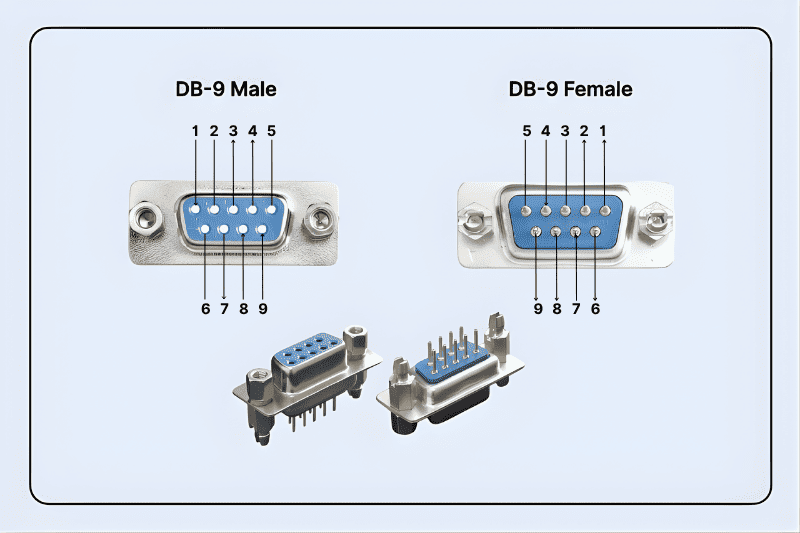
Connector Types: DB9, DB25, and RJ45
Choosing the right connector type is fundamental for ensuring compatibility between devices. Several common connector types exist for RS232 applications:
- DB9: This is the most prevalent connector, featuring 9 pins, commonly used in modern devices.
- DB25: An older standard with 25 pins, still in use in various legacy systems.
- RJ45: Occasionally adapted for RS232 connections, particularly in network-related environments.
Understanding the specific requirements of the devices in use will guide the selection of the correct connector, preventing potential compatibility issues in data transmission.
Importance of Shielding for EMI Protection
Electromagnetic interference (EMI) is a significant concern in RS232 communication. Given the susceptibility of RS232 signals to interference, selecting cables with adequate shielding is vital. Shielding can help mitigate external noise and enhance signal quality.
Shielded cables are designed to protect the signals from disruptions caused by adjacent electronic devices or environmental factors. When in a noisy electromagnetic environment, investing in well-shielded cables can be crucial for maintaining reliable communication.
Ensuring High-Quality Materials and Construction
The quality of materials used in cable construction significantly affects the overall reliability of the RS232 connection. Cables should be manufactured from high-quality materials that can withstand their intended environment. This includes considering factors such as flexibility, durability, and resistance to wear.
Additionally, the construction should adhere to industry standards to ensure compatibility and performance. Cables built using subpar materials may lead to increased failure rates and communication disruptions throughout their operational life.
Avoiding Common RS232 Serial Port Connection Errors
Successful communication through RS232 serial port requires attention to detail, especially regarding cable types, pin configuration, and troubleshooting methods. Understanding common pitfalls can enhance effective operation.
Identifying Mismatched Cable Types
Cable mismatching is a frequent issue encountered when working with RS232 systems. Using the incorrect cable type, such as a straight-through cable when a null modem is required, can prevent proper data transmission. It is essential to recognize the specific cable required for the devices being connected. Standard straight-through cables are appropriate for DTE to DCE connections, while null modem cables are necessary for connecting two DTE devices directly.
To effectively identify cable types:
- Check device specifications for recommended cable configurations.
- Examine the pinouts to confirm compatibility.
- Utilize visual indicators, such as labels, to differentiate between cable types.
Proper Pin Configuration and Signal Grounding
Correct pin configuration is critical for reliable communication. Each RS232 device has designated pins for transmission and reception of data. Misconfigurations can lead to communication failures. Ensuring proper grounding is another essential component. Adequate grounding helps minimize electromagnetic interference (EMI) that can disrupt signals. Tightly linked grounds between devices can enhance signal integrity and reliability.
For optimal performance, consider these steps:
- Consult the devices’ manuals to verify pin assignments.
- Ensure that the ground pins are correctly connected to both devices.
- Use shielding in environments susceptible to EMI to protect the integrity of the communication.
Troubleshooting Communication Failures
Communication failures in RS232 systems can stem from various factors, including incorrect cables, improper connections, or environmental issues. When a failure occurs, systematic troubleshooting can help identify and rectify the problem efficiently.
Begin troubleshooting by following these steps:
- Verify the cable type being used matches the connection requirements.
- Confirm that all pin connections are correctly aligned and securely fastened.
- Check power supplies and ensure that both devices are operational.
- Inspect surrounding environments for potential interference sources, such as heavy machinery or RF devices.
A methodical approach will streamline the process of diagnosing and resolving issues, leading to a more stable RS232 communication setup.
The Role of RS232 Serial Port in Modern Communication Systems
The RS232 serial port continues to play a crucial role in the landscape of modern communication systems, despite the emergence of newer technologies. Its traditional reliability, simplicity, and ease of use make it a valuable asset for various applications.
Integration with Ethernet and Other Protocols
RS232 serial ports are often integrated with Ethernet and other communication protocols to achieve a versatile data transmission framework. This combination allows for enhanced flexibility in connecting legacy devices with current networking technologies.
- The integration facilitates communication between older equipment and modern networks, allowing seamless data exchange.
- For example, industrial automation systems can use RS232 to interface with Ethernet controllers, enabling real-time monitoring and control.
- Furthermore, bridging RS232 with protocols like TCP/IP allows devices to communicate over the internet, expanding their operational capability.
Future Use Cases for RS232 and Custom Serial Cables
As new technologies develop, the role of RS232 and custom serial cables is evolving. Future applications might embrace RS232’s unique characteristics in various sectors.
- In IoT, RS232 can act as a gateway for older sensors and devices to connect to modern networks.
- Custom serial cables will likely see increased demand for specific configurations that cater to unique devices, enhancing overall system compatibility.
- With industrial applications continuing to thrive, RS232 remains a reliable choice for connecting machinery where modern alternatives may not be feasible.
Maintaining Legacy Systems with RS232 Support
Many industries maintain legacy systems that rely on RS232 for uninterrupted operation. Organizations are tasked with ensuring these systems remain functional alongside new technology.
- Regular maintenance of RS232 connections helps prevent deterioration that could lead to communication failures.
- Utilizing quality custom serial cables ensures reliable communication pathways are preserved.
- Efficient support and troubleshooting are necessary to address common issues related to RS232, thereby extending the lifespan of these systems.
If you would like to receive a quote for any of custom cables or connectors, please do not hesitate to contact us by sending an email to sales@readytogocables.com or calling in the USA this phone number (682-325-1944).